Showing posts with label concepts. Show all posts

Sunday, October 20, 2013

Swapsies Sports! ((APP REVIEW & GIVEAWAY))

Do you have students that love sports?  Do you have students working on matching, basic vocabulary, answering questions, following directions, and more?!  Keep reading!!!  This new app may be perfect for you!

The developers Spinlight has created a brand new app.  They recently contacted me and offered me an opportunity to check out and share it with you!  Remember, the thoughts and opinions are all mine!  

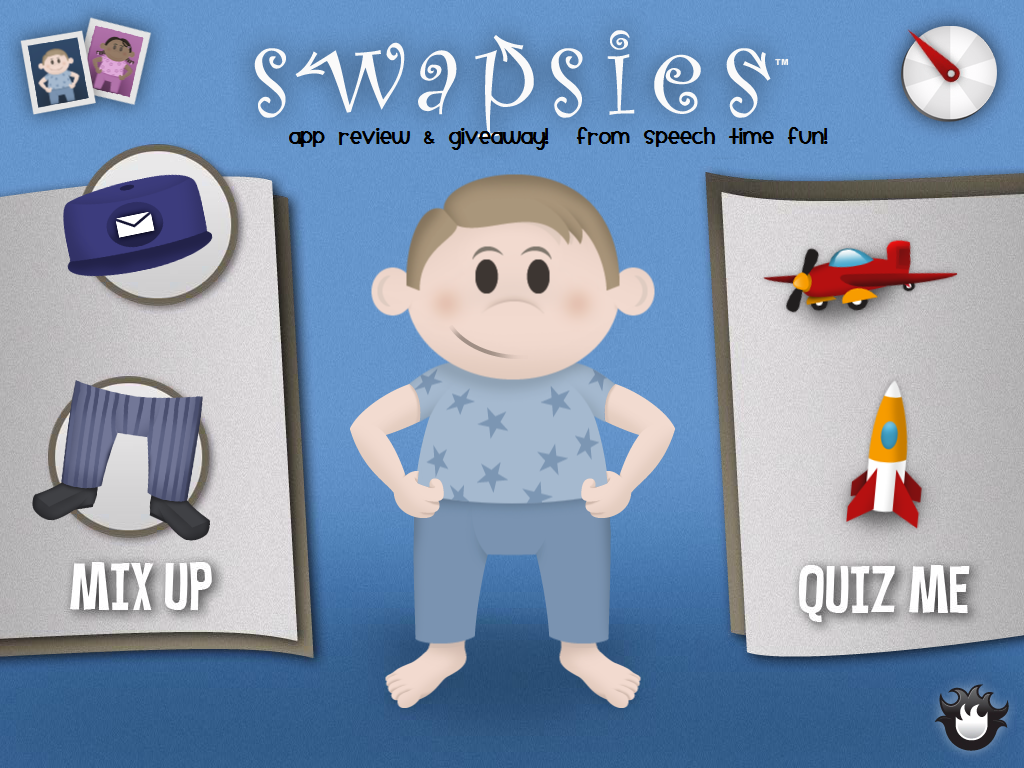
Above you will see the page you are brought to once you open the app.  If you click the two photos on the top left of the page, you can change the character.  
There are two activities: mix up and quiz me.  I like to start with mix up!

As you can see above, students have to move the photos in the three bubbles left and right to make a match of an uniform on the character in the middle.  Oh the giggles you will get as they make mix ups!  You can work on yes/no questions here: "do soccer players wear a helmet?"  It is a great way to review sports and sports equipment vocabulary.  It also helps that each sport has a color scheme to help you figure out what goes together as well!  Students need more help?  they can click the "list" button next to the "can you make a match?" tab on the top to see all of their choices:
You can take this list and easily do an associations activity: what goes with soccer?

Now time to check out the quiz me feature.  It is exactly as it sounds.  A little quiz!  A great way to review the vocabulary learned with this app and in other activities in your therapy rooms.  It also is a great way to work on answering questions.
Students can keep trying until they answer accurately which is a feature I really like.  I love opportunities for students to learn from their mistakes.  After several questions, students are rewarded with a bonus round (regardless if they get answers right of wrong.)  These bonus rounds have students locate different locations and objects within sports categories.  Below, my students had to locate all objects related to hockey.  As they click correctly, they were given a check mark as feedback.

Learn more about this $1.99 app by visiting iTunes.  To celebrate the release of this brand new app, Spinlight was generous to provide me 5 of their original Swapsies app that addresses occupations!!  Click HERE to check out my review of that app!  
Enter to win below!
a Rafflecopter giveaway

Monday, July 29, 2013

Basic Concepts Skills Screener ((App Review & GIVEAWAY!))

I was so excited when I was contacted by the developers, Smarty Ears about their new screener app.  I love apps like this because it provides great baseline data for RTI or IEP students with goals that correlate to the skills in the apps.  As you can tell by my TpT products, I love apps that provide me with information to where to start treatment and if students are responding.  I am so grateful to have gotten the opportunity to preview this app for you and to host a giveaway as well!!  Keep reading to learn more!  Remember, the opinions are all mine!

This app was developed for the purpose of evaluating and describing the basic concept skills of children at the receptive level.  Receptively, students must point/touch a picture based on a particular concept on each screen/probe.  Students are provided with audio prompts.  Each prompt provides 4  pictures for students to pick from.


When you first open up the app, you are provided with setting options for language preference:

Then, you can enter students into the app.  Are you on summer break?  You can input your students and their date of births in so all you have to do once you return is just use the app!  The app automatically calculates the chronological ages.  Since it is a screener app, you would use this app with one student at a time.

Once you decide which student you are going to use this app with, you can decide if you are going to do the "quick screening" or "full screening."

Receptively, students must point/touch a picture based on a particular concept on each screen/probe.  Students are provided with audio prompts.  Each prompt provides 4  pictures for students to pick from.


Some amazing features this app provides:


  • You can input notes while administering right on the app so all of your information is stored in one place

  • The app provides of a tally of questions remaining so you can see how much longer you have (and those impatient students can see for themselves)
  • The concepts used correlate to school readiness/common core
  • Can export to the Therapy Report Center
  • Automatic feedback is provided to keep students motivated and engaged.  Students are provided with this "sound" and "visual" feedback regardless if they get the answers right or wrong.  This way students don't get discouraged.
  • Can e-mail/print scores to keep in student files or save on a desktop
  • Can click "done" at any point if you run out of time or if too difficult/easy for students
  • You can also click "next" once you are ready.  The app doesn't move onto the next page after students respond.  This provides time for you to assess expressive language although the app does not assess for it.  I recommend using the "notes" feature in the top left corner for documenting expressive responses.
  • The app uses the Smarty Stick symbols.  These symbols can be found in the other Smarty Ear's apps so can be familiar to your students.  Also, if you have the Custom Boards app, you can easily create visuals and activities using concepts students responded incorrectly to.
Concepts targeted:
  • Prepositions/location
  • Size
  • Part/whole
  • Same/different
  • Emotions
  • Texture
  • Sequential
  • Temperature
  • Amount
  • Always/sometimes/never
  • Age

Once the assessment is completed, students are provided with reinforcement:
Here is a view of the results pages:


Visit iTunes!  Do you want to win a copy for yourself of this great $9.99 app?!  Enter to win below!  Good luck!

a Rafflecopter giveaway